
Quick answer: To see a learner’s full training record, go to the Learners page, select the three dots on their row, then View Progress. It’s the same page the learner sees as My Progress.
- In the menu (top right), search for Learners and open it.
- Find the learner, then click the three dots on their row.
- Click View Progress. Their record opens in a new tab.
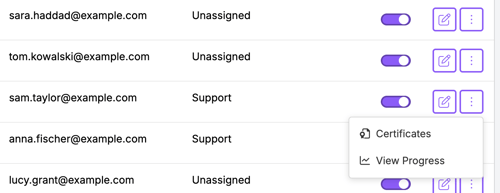
View a learner’s training record
- Click a tab to choose the type of training, such as Courses, Policies or Risk Assessments.
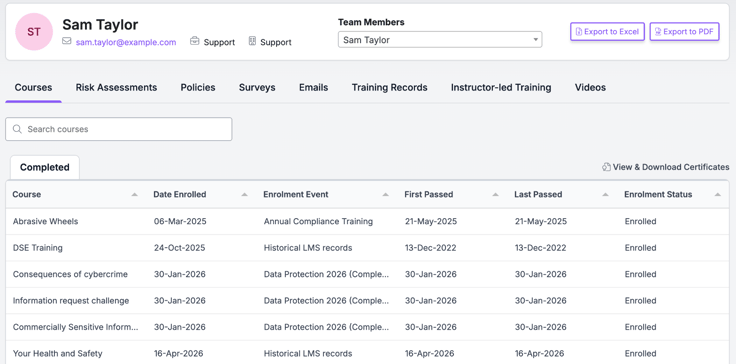
- On the Courses tab, check Completed for the courses they've finished, with their first and most recent pass dates.
- Scroll down to Incomplete for the courses they still need to do.
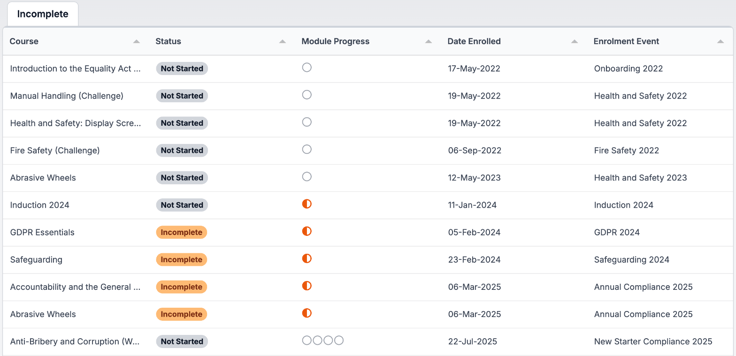
In the Incomplete list:
- Status shows Not Started if they haven’t opened the course yet, or Incomplete if they’ve opened it but not finished.
- Module Progress shows one icon for each module:
- grey: not started
- half orange: in progress
- green tick: complete
Tip: If you manage a team, use Team Members at the top to switch between the people in it.
Export a learner’s training record
- To download a spreadsheet: click Export to Excel. It has a sheet for each type of training, whichever tab you're on.
- To download a PDF: click Export to PDF.
- To get their certificates: click View & Download Certificates on the Courses tab.
Check which emails they've been sent
On their progress page, open the Emails tab to see the emails Astute has sent them.
To check many learners at once, see Checking who has completed training
Something isn't working?
I can't see "View Progress"
You can open the progress of anyone you can see on the Learners page. If a learner isn't there for you, ask support to check your access.
A course they've started still shows as "Not Started"
The status changes when the learner closes the course. If they left it open, ask them to open it again and close it when they finish. Their progress is saved. If it still shows Not Started, contact support.
I can still see training from an event that has ended
This is expected. When an event ends, its training comes off learners’ home pages, but it stays in My Progress, My Certificates and LXP Reporting as a record of what they’ve done. If the training is still on the learner’s home page, the event may have been hidden rather than ended. A hidden event stays open, and its learners keep their activities. To close it, set an End Date.
They've passed, but a module shows as incomplete
See Why does a passed course show an incomplete module in an LXP report?
They say they've finished, but it still shows as "Incomplete"
Contact support with their username, the course name and a screenshot of their record.
I want to log in as the learner to check
Admins can't log in as a learner. Use View Progress instead.
Related articles: Checking who has completed training · Why does a passed course show an incomplete module in an LXP report? · Editing a learner's details