
Quick answer: In Catalogue Settings, click Add to catalogue on each course you want, then click Save changes. Learners only see the courses you add.
Before you begin
- The Catalogue is an optional page where learners browse courses and enrol themselves.
- It is separate from a self-enrol event. See Letting learners self-enrol
- New courses are never added automatically. They appear in Catalogue Settings, ready to add.
- If learners used the Catalogue before, it starts with the courses they could already see.
- Every learner sees the same courses. To offer a course to one group only, use a self-enrol event.
Add courses
- In the menu (top right), search for Catalogue Settings and open it.
- Search by name, or use the Jurisdiction, Industry, Duration and Course type filters.
- Click a course to read what it covers.
- Click Add to catalogue on each course you want. To add every course in the list, click Add all visible.
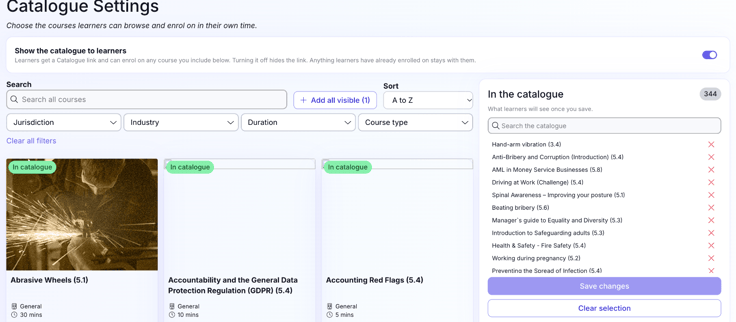
- Check Show the catalogue to learners is switched on, at the top of the page.
- Click Save changes. Learners don't see any change until you save.
Learners then get a Catalogue button on their home page.
Remove a course
- In the In the catalogue panel, click the X next to the course. It's crossed out until you save, so you can undo it.
- Click Save changes.
Removing a course stops new enrolments. Learners already on it keep it, with their progress.
Switch the Catalogue off
- Click the Show the catalogue to learners switch.
- Click Save changes.
Learners lose the Catalogue button but can still finish courses they've already enrolled on. Courses can still be added and removed while it's off.
Tip: To make staff take a course, enrol them on it with an enrolment event instead. Courses learners pick from the Catalogue don't count in Compliance Reporting. See Why is an event or learner missing from Compliance Reporting?
Something isn't working?
Learners can't see the "Catalogue" button
Check:
- Show the catalogue to learners is switched on
- The Catalogue has at least one course
- You clicked Save changes
A learner enrolled themselves on a course I don't want them on
Remove the course so no one else picks it. If the learner hasn't finished it, they can unenrol from My Self Enrolments on their home page.
A course I removed is still on a learner's home page
That's expected. Removing a course only stops new enrolments, so learners already on it keep it.