
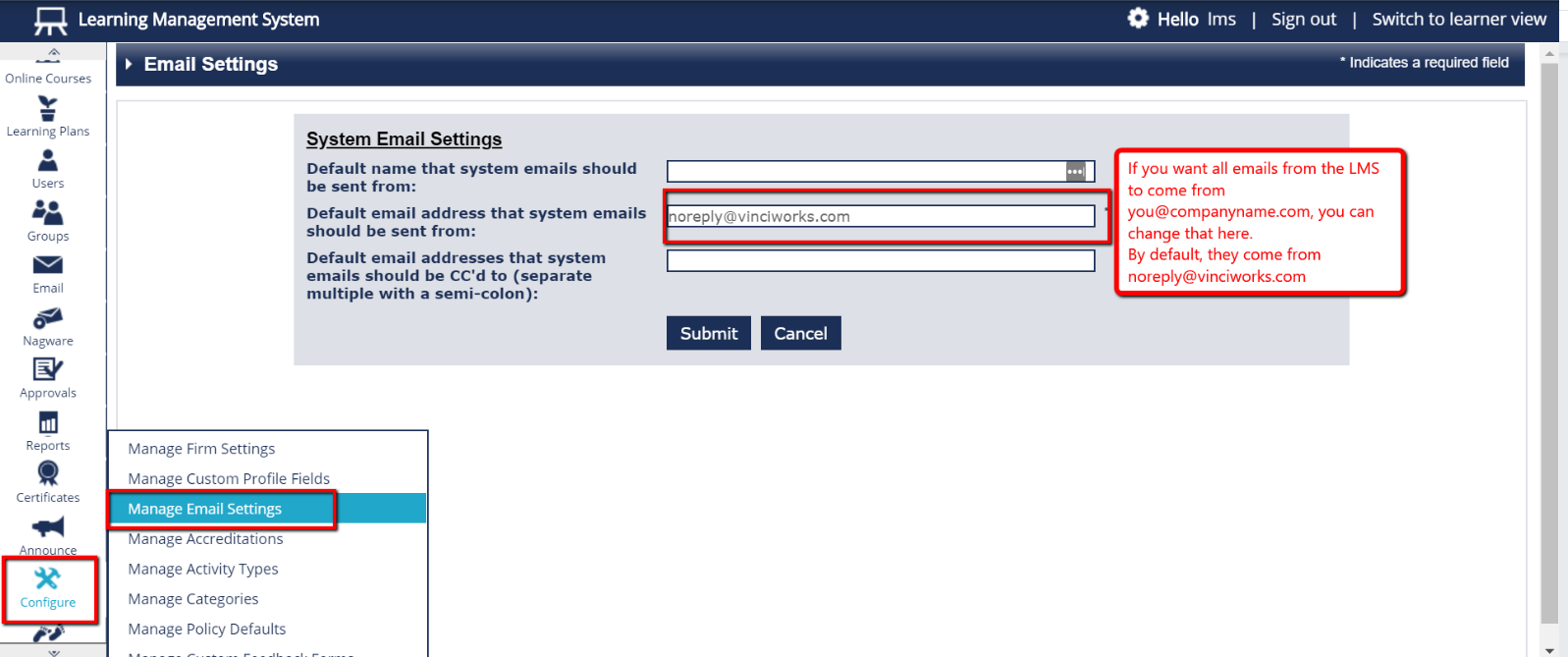
- To send system emails from you@yourcompanyname.com or something similarly customised, select “Configure” from the Menu bar on the left side of the page, and then select “Manage Email Settings”.
- “Default name that system emails should be sent from” could be “Your First Name and Last Name”
- “Default email address that system emails should be sent from” could be “you@yourcompanyname.com”
- “Default email addresses that system emails should be cc’ed to” should be filled in with the email address(es) of anyone who should receive a copy of ALL system emails. If you have more than one, they should be separated by a semicolon. For example training@yourcompanyname.com;risk@yourcompanyname.com
Please note:
If you would like to send system emails from you@companyname.com, your IT must add our SMTP email server to your company’s email filter whitelist. That will prevent them getting stuck in the spam filter.
Our SMTP server IP is 185.13.246.162.
The emails originate from the domain lms-sys.com and the specific machine name is web1.lms-sys.com.