
Quick answer: In My Competency, confirm you've considered the SRA Competence Statement, add your learning needs, record the activities that meet them, then tick the annual declaration before 31 October.
Open the CCM
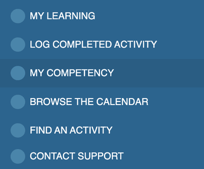
- In the menu on the left, select My Competency.
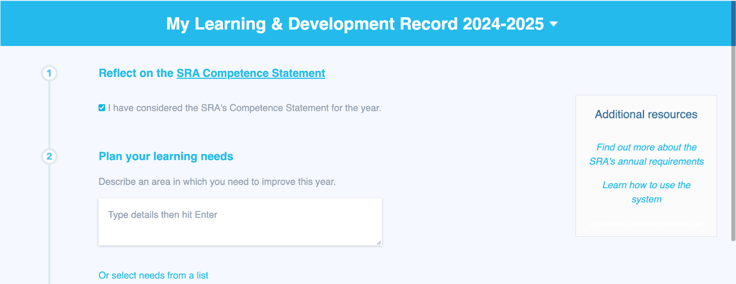
Your My Learning & Development Record for the year opens.
Reflect on the SRA Competence Statement
- Click SRA Competence Statement to read it.
- Tick I have considered the SRA's Competence Statement for the year.
Plan your learning needs
- Type an area you need to improve in the box, then press Enter.
- Or click Or select needs from a list, tick the needs, then click Select these needs at the bottom.
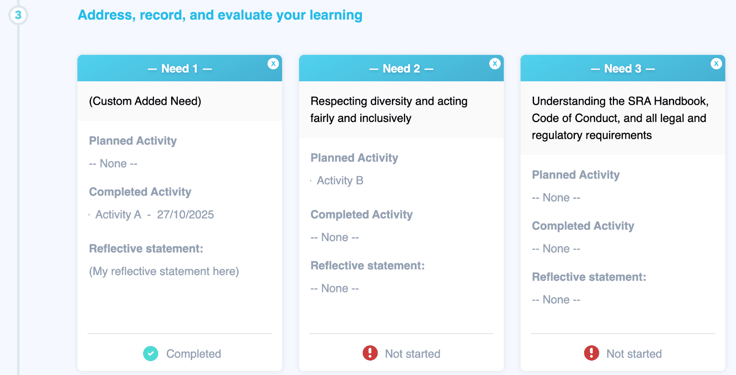
Address, record and evaluate your learning
- Click a need to open it.
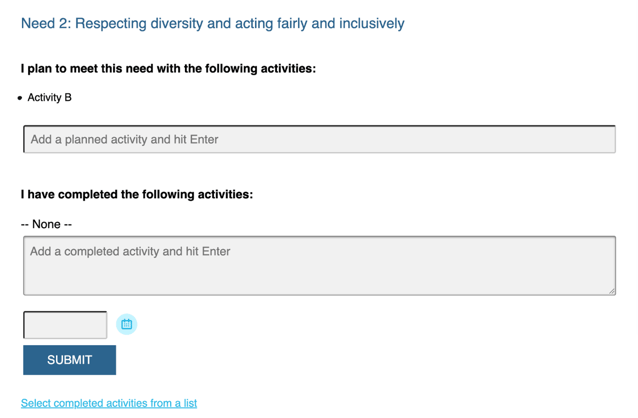
- Under I plan to meet this need with the following activities, type an activity and press Enter.
- Under I have completed the following activities, type what you did, choose the date and click Submit.
To use training you've already logged, click Select completed activities from a list.
- Under Reflective statement, write what you learnt, then click outside the box.
- Set the Status: Not started, In progress, Completed or Deferred.
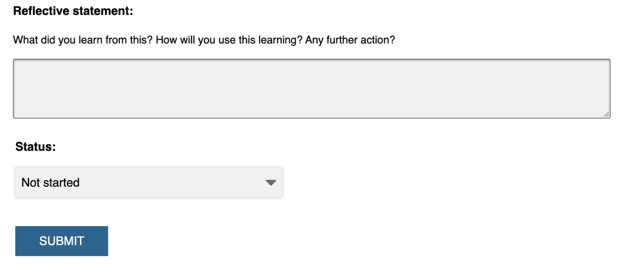
- Click Submit.
For conferences, workshops or other outside training, see Logging training done outside the LMS.
Make your annual declaration
- Before 31 October, tick I have reflected on my practice and addressed any identified learning and development needs.

To keep a copy, click Print my learning record for the year. To see an earlier year, use the year menu at the top of your record.
Something isn't working?
My learning needs from the list didn't save
Scroll to the bottom of the list and click "Select these needs".
Something I typed disappeared
Press Enter after typing a need or a planned activity. For a reflective statement, click outside the box to save it.
I can't see the declaration
Some organisations keep it hidden until nearer the end of the CCM year. Check with your admin.
I can't find a course to link
Courses your admin has archived can't be linked. Ask your admin.
I can't see "My Competency"
Ask your admin to check your access to the CCM.
Related articles: Logging training done outside the LMS