
Quick answer: In the menu (top right), search for Quick Quiz, create a quiz, set a pass mark and add your questions. Preview it, publish it, then add it to an enrolment event.
Need learners to type their answers? Use a Survey instead. Quick Quiz questions are all pick-an-answer.
Build the quiz
- In the menu (top right), search for Quick Quiz and open it.
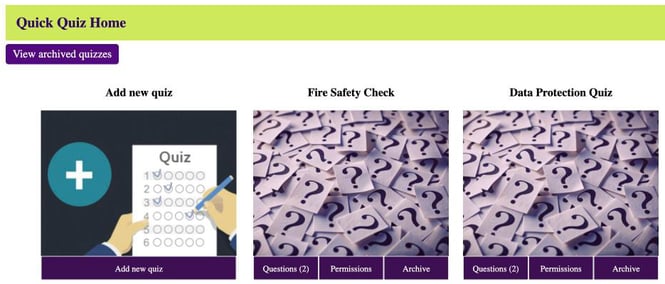
- Click Add new quiz. Add a clear title, which learners see on their home page, and a description and duration if you want.
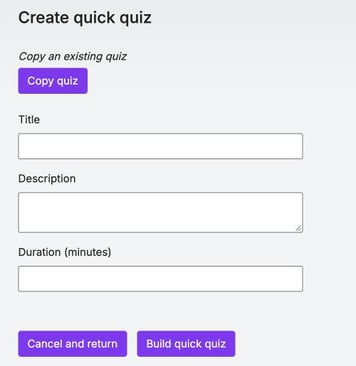
- Click Build quick quiz, then set the pass mark, for example 80%.
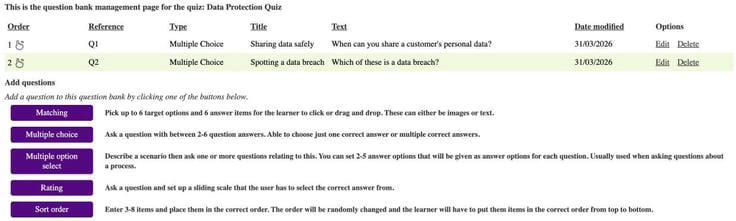
- Pick a question type from the buttons under Add questions, then add the question, its answer options and the correct one.
- Choose any settings you want, such as Randomise Question Order or Show question by question feedback.
Tip: There's no bulk upload, so add questions one at a time. Write them as plain text: bullet points, line breaks and bold won't show as you typed them.
Preview and publish it
- Click Preview Quiz and work through it as a learner would.
- Click Publish.
Add it to an enrolment event
Add the quiz as an activity on an enrolment event, the same way as a course. See Creating an enrolment event
Want learners to read a policy or watch a video first? Use a Programme to set the order, so the quiz unlocks once they've done it.
Note: Learners don't see the pass mark before they start. If they need to know it, put it in the quiz title or description.
Something isn't working?
Quick Quiz isn't in my menu
It has to be switched on for your organisation and included in your admin access. Ask support to check.
I want images in my questions
Use the matching question type, where learners match an image to an answer. Multiple choice questions don't show images.
I need to change a quiz that's already live
Click Add new quiz, then Copy quiz, and change the copy. Enrol the learners who haven't finished on a new event, and set an End Date on the original event. Changing the pass mark doesn't re-mark results already recorded.
Learners want a certificate
Quick Quizzes don't issue certificates.
Related articles: Checking who has completed training · Viewing Quick Quiz results