
Quick answer: Create the field on the Additional Fields page and fill it in for your learners. Then use it in enrolment rules and as a filter in reports. Examples are Employee ID or Staff Location.
Create an additional field
Choose these first:
- Type: Text is typed in. List gives a drop-down of options you add.
- Mandatory: a learner can't be saved, or added from a file, without a value.
- Reports: tick it so the field can be a column in LXP reports.
- Unique: only shows for Text fields.
- In the menu (top right), search for Additional Fields and open it.
- Click Add Additional Field.
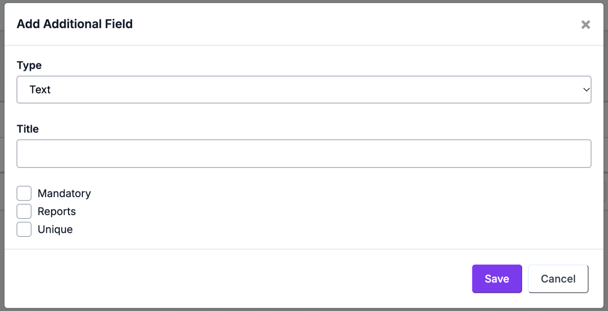
- Choose the Type, then enter a title.
- Tick Mandatory, Reports or Unique if you need them.
- For a List, type each option under List Options and click Add.
- Click Save.
Note: If you tick Mandatory, existing learners can't be saved after an edit until the field has a value.
Fill it in for your learners
For one learner, click the pencil on their row on the Learners page, enter the value and click Save.
For many learners:
- On the Learners page, tick the learners.
- Click Manage Selected, then choose Additional fields.
- Choose the field and its value, add it, then click Save.
Or use a file: the Import Learners template has a column for each field, and empty cells keep what's there. See Importing learners from a file
Use it in enrolment rules
- On the enrolment event, click the Rules tile.
- Choose your additional field, then in or not in.
- Choose the values.
Use not in to leave a group out, such as contractors. Learners with no value don't match an in rule, but they do match a not in rule. See Enrolling learners automatically with rules
Filter reports by it
- Compliance Report: pick it under Additional Fields. See Using the Compliance Report
- LXP Reporting: add it as a column. See Building an LXP report
Fill it from your HR system
If your learners come from a user sync, create the field first. Then contact support with:
- The field's name in Astute.
- The field in your HR system that holds the value.
- A few example values.
Something isn't working?
A learner won't save
The field is mandatory and empty. Enter a value, then save.
A learner wasn't enrolled by my rule
Check they have the value the rule asks for. Rules run overnight, so check again the next day.
I can't find "Additional Fields" in the menu
Ask support to check your access.
The importer doesn't recognise a column
Pick the field it should be from the list, or leave the column out.
Related articles: Enrolling learners automatically with rules · Importing learners from a file · Editing a learner's details