
Quick answer: A nag is an automatic reminder email from Nagware to users who haven't completed their assigned training. There are three kinds: one-off, repeating and escalating.
Nagware is a tool used to remind users to complete their assigned online training. It is currently available as a feature of VinciWorks LMS Professional. If you don't see Nagware in your menu, ask support to check your access.
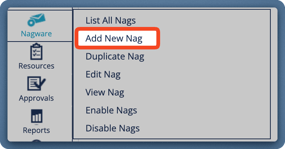
If a user has been enrolled on a course but has not yet completed it, a nag can automatically send reminder emails after a specified period of time. This helps organisations improve completion rates and reduces the need for manual follow-up.
You can configure nags in different ways depending on how persistent or urgent the reminders need to be.
What types of nag are there?
There are three main types of nags you can use. Each one is designed for a different reminder strategy.
One-off (single reminder) nags
A one-off nag sends a single reminder email after a specified period of time.
This is useful when:
- You want to send one gentle reminder
- You have a fixed deadline approaching
- You plan to review completion manually afterwards
Example: Send one reminder 14 days after enrolment.
To learn how to create this type of nag, see:
Setting up a one-off reminder nag
Repeating nags
A repeating nag sends the same reminder email at regular intervals until the user completes the course. This is the most common reminder setup for mandatory training.
This is useful when:
- You want reminders to continue automatically
- Training must be completed eventually
- You do not need the tone of the message to change
Example: Send a reminder every 7 days until the course is completed.
To learn how to create this type of nag, see:
Escalating nags
An escalating nag sends a sequence of reminders with increasing urgency over time. Instead of repeating the same message, each reminder can use stronger language or come from a more senior sender.
This is useful when:
- Training is critical or time-sensitive
- Completion deadlines are approaching
- You want reminders to become more urgent
Example:
- First reminder: friendly reminder from HR
- Second reminder: stronger reminder from Risk
- Final reminder: escalation from senior leadership
To learn how to create this type of nag, see:
Choose the right type of nag
- Send one reminder only: use a one-off nag
- Keep reminding users until they complete: use a repeating nag
- Increase urgency over time: use an escalating nag
Why use nags?
Nags help organisations:
- Improve training completion rates
- Reduce manual follow-up from administrators
- Ensure compliance with mandatory training requirements
- Keep users informed about outstanding training
What other types of nags are there?
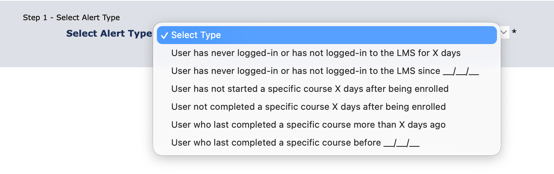
In addition to reminders for incomplete training, Nagware can also be used to monitor user activity and course renewal requirements.
These alerts are typically used in more specific scenarios and follow the same setup process as other nags.
Login and activity reminders
These nags can be used to identify users who have not accessed the system. They are useful for encouraging engagement or identifying inactive users.
Examples include:
- User has never logged in to the LMS
- User has not logged in for a specified number of days
- User has not logged in since a specific date
These reminders are often used during onboarding or when monitoring system usage.
Course progress reminders
These nags remind users about courses they've been assigned but haven't started or finished yet.
Related articles: Sending reminders without Nagware